ChatGPT Business tai Enterprise on käytössä, mutta se ei tunne teidän järjestelmiänne.
Kun kysytte, miten laskutus tai tilausten käsittely oikeasti toimii, se vastaa yleistiedolla
tai arvaa. Teemme järjestelmän koodista jäljitettävän dokumentaation ja tuomme sen
ChatGPT:hen MCP-yhteydellä. Sen jälkeen liiketoiminta ja kehittäjät kysyvät omasta
järjestelmästä samassa chatissa, jota jo käyttävät.
You use ChatGPT Business or Enterprise, but it does not know your systems.
Ask how billing or order handling actually works, and it answers from general knowledge
or guesses. We turn the system’s code into traceable documentation and bring it
into ChatGPT through an MCP connection. After that, the business and developers ask
about their own system in the chat they already use.
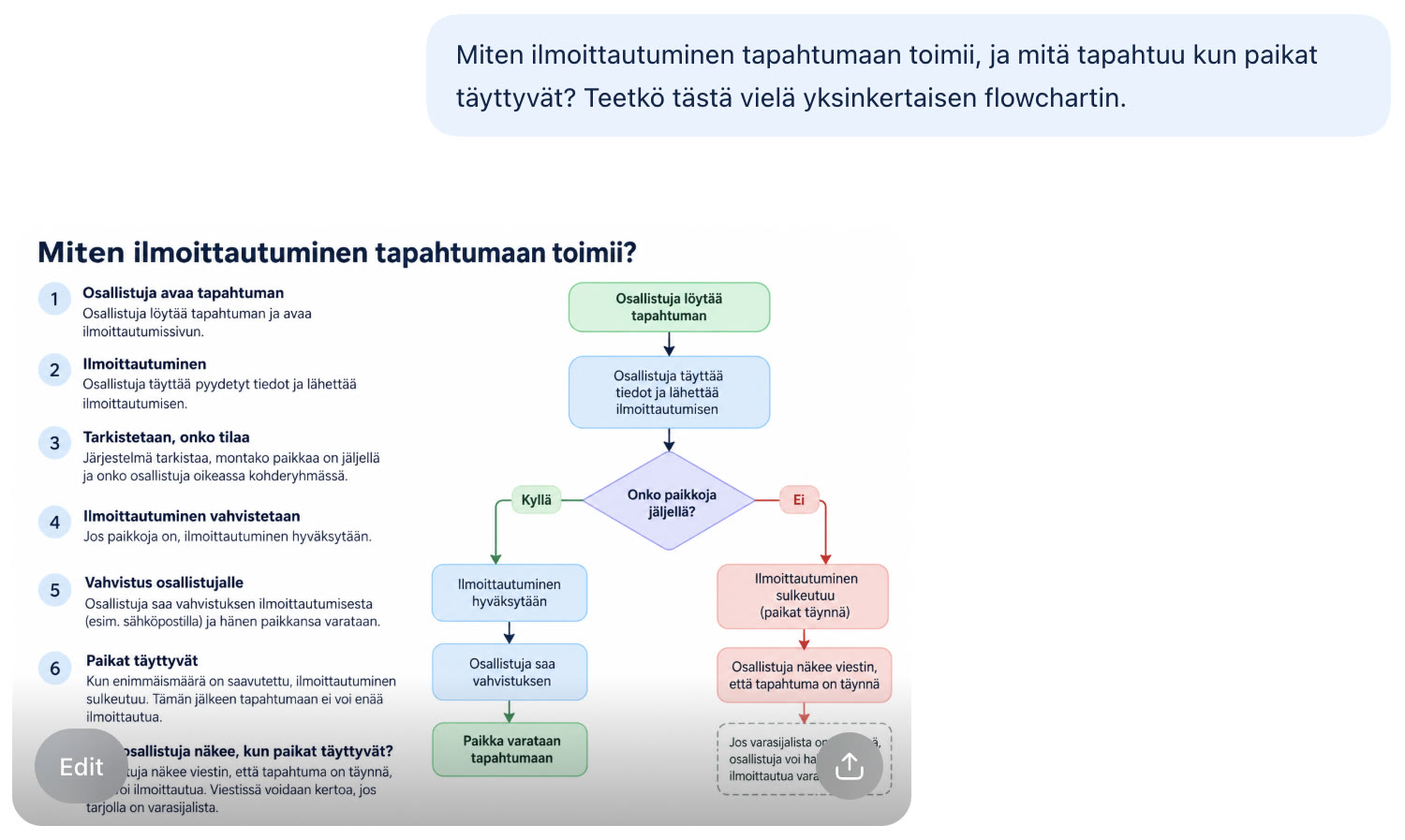
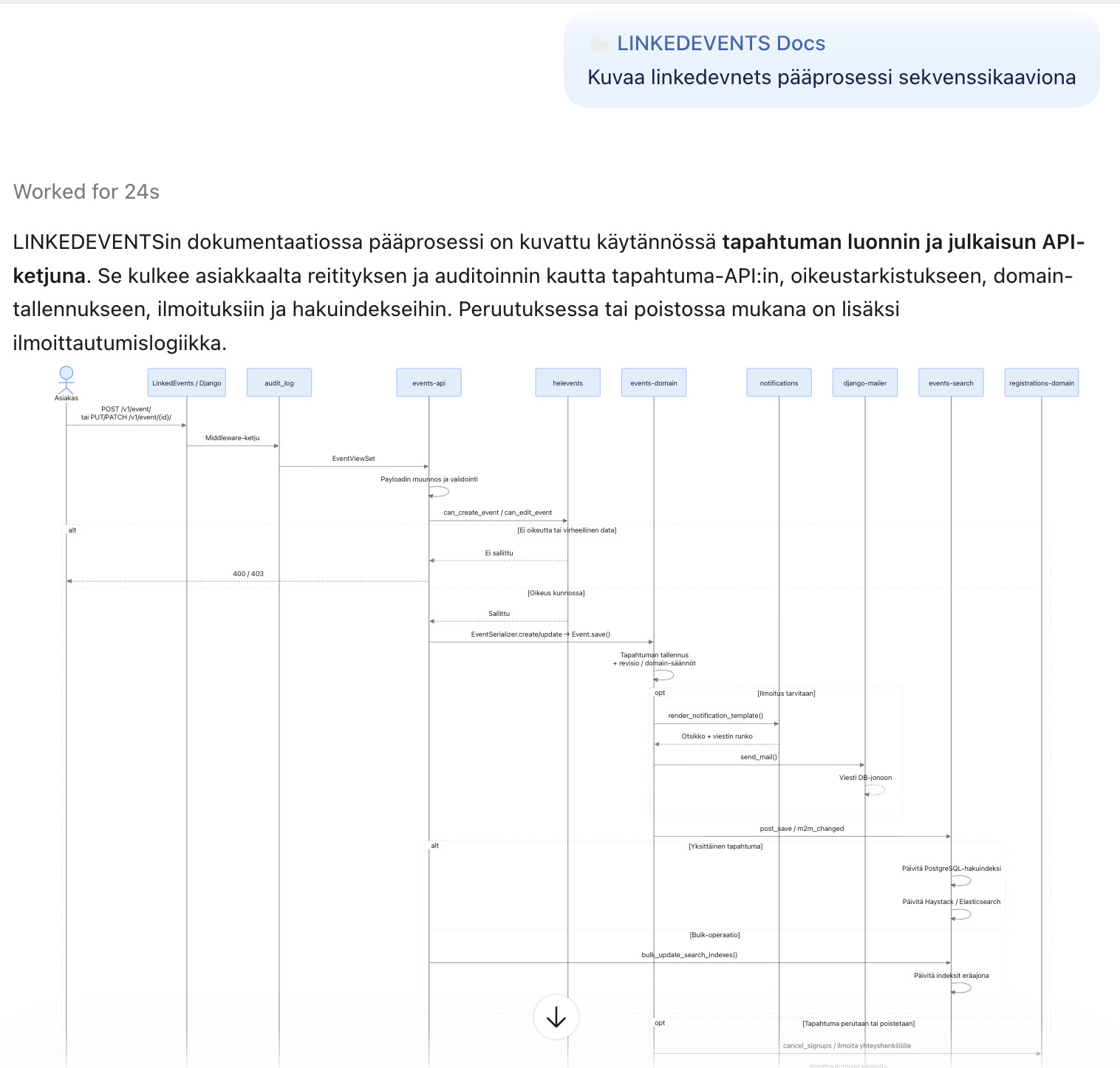
Liiketoiminnan kysymykseen ChatGPT vastaa selkokielellä
ja vuokaaviona, kehittäjän kysymykseen sekvenssikaaviona, jonka osat ovat koodipohjan oikeita
kansioita. Molemmat vastaukset tulevat samasta, koodista tuotetusta dokumentaatiosta.
ChatGPT answers a business question in plain language
and as a flowchart, and a developer’s question as a sequence diagram whose parts are real folders
in the codebase. Both answers come from the same documentation generated from the code.
LiiketoimintaMiten ilmoittautuminen toimii ja mitä tapahtuu, kun paikat täyttyvät? Vastaus selkokielellä ja vuokaaviona.KehittäjäPääprosessi sekvenssikaaviona: rajapinta, oikeudet, tallennus, ilmoitukset ja hakuindeksi.
BusinessHow does registration work, and what happens when places run out? Answered in plain language and as a flowchart (in Finnish).DeveloperThe main process as a sequence diagram: API, permissions, storage, notifications and search index.
Aidot kuvakaappaukset ChatGPT:stä. Koodipohja on julkinen avoimen
lähdekoodin Linked Events,
jota käytimme testinä. Ei asiakastyö. Vastauksen sanamuoto ja kaavion piirros ovat AI:n; sisältö
tulee koodista tuotetusta dokumentaatiosta.
Koko läpivienti videolla, 7 min.
Real screenshots from ChatGPT. The codebase is the public open-source
Linked Events,
which we used as a test. Not client work. The wording of the answer and the drawing of the diagram
are the AI’s; the content comes from documentation generated from the code.
Full walkthrough on video, 7 min (in Finnish).
Miten dokumentaatio päätyy ChatGPT:hen
How the documentation gets into ChatGPT
1 · Dokumentaatio
Koodista, jäljitettävästi
Jokainen väite on sidottu lähdetiedostoihin, committiin ja tarkistuksen tilaan. Vastauksen lähteen voi aina pyytää näkyviin.
2 · MCP-palvelin
Teidän verkossanne
Palvelin lukee vain julkaistua dokumentaatiota. Useita järjestelmiä saman palvelimen alla, kukin erillään.
3 · ChatGPT
Yhteys työtilaan
Business- tai Enterprise-työtilan ylläpitäjä lisää yhteyden. Yksityinen palvelin tavoitetaan tunnelin kautta.
1 · Documentation
From the code, traceable
Every claim is tied to source files, a commit and a review state. You can always ask for the source of an answer.
2 · MCP server
In your network
The server reads only published documentation. Several systems under one server, each kept separate.
3 · ChatGPT
Connected to your workspace
The Business or Enterprise workspace admin adds the connection. A private server is reached through a tunnel.
Ei sido ChatGPT:hen. Sama dokumentaatio toimii myös Claudessa, Copilotissa ja
Cursorissa. Microsoft 365 Copilot vaatii tenantin ylläpitäjän määrittämän yhteyden.
Toteutettavuus tarkistetaan clienteittain ennen sopimusta.
Not tied to ChatGPT. The same documentation also works in Claude, Copilot and
Cursor. Microsoft 365 Copilot requires a connection configured by the tenant administrator.
Feasibility is checked per client before contracting.
Ei omaa MCP-yhteyttä? Jos työtilanne ei salli omia MCP-yhteyksiä,
dokumentaatio toimitetaan tiedostoina ja valmiina ohjetekstinä ChatGPT-projektiin.
Tiedostot ovat kopio tietystä versiosta: ne eivät päivity koodin mukana, ja kaikki,
joilla on pääsy projektiin, näkevät koko sisällön. Kun dokumentaatio muuttuu,
toimitamme uuden version. Koko dokumentaatio ladataan tällöin ChatGPT:hen, joten
sama AI-linjausten arvio koskee sitä.
No MCP connection of your own? If your workspace does not allow custom
MCP connections, the documentation is delivered as files and ready-made instructions for
a ChatGPT project. The files are a copy of a specific version: they do not update with
the code, and everyone with access to the project sees all of the content. When the
documentation changes, we deliver a new version. In this case the whole documentation is
uploaded to ChatGPT, so the same AI policy assessment applies.
Mihin dataa kulkee? MCP-palvelin voi olla omassa verkossanne, mutta vastaus
muodostetaan ChatGPT:ssä: kysymykseen palautetut dokumentaatio-otteet kulkevat sen kautta.
Siksi yhteys arvioidaan organisaationne AI-linjausten mukaan ennen käyttöönottoa. Vastauksen
sanamuoto on AI:n, lähde ei ole.
Where does data go? The MCP server can run in your own network, but the answer
is formed in ChatGPT: the documentation excerpts returned for a question pass through it. That is
why the connection is assessed against your organization’s AI policy before rollout. The wording
of the answer is the AI’s; the source is not.
Samasta dokumentaatiosta AI saa myös tikettien aloituskontekstin: mihin järjestelmän osaan
muutos osuu ja mitä muuta samaan dataan liittyy. Kaksi kanavaa →
The same documentation also gives AI the starting context for tickets: which part of the system
a change touches and what else uses the same data. Two channels →
Näette tuloksen omasta koodistanne ensin
See the result on your own code first
Vaihe 1
Ensikartoitus
Rajattu repo-oikeus tai zip. Alustava tilannekuva: mitä löytyi ja mikä pitää vahvistaa.
750 €
Vaihe 2
Osa-alueiden läpikäynti
Työpaja teknisen vastuuhenkilön kanssa. Vahvistettu osa-aluejako pilotin valintaan.
450 €
Vaihe 3
Dokumentointipilotti
Yksi rajattu osa-alue dokumentoituna. Live-demossa näette, miten AI-chat vastaa sen pohjalta.
800 €
Step 1
First survey
Scoped repository access or zip. An initial picture: what was found and what must be confirmed.
€750
Step 2
System area review
Workshop with a technical owner. A confirmed system-area split for choosing the pilot.
€450
Step 3
Documentation pilot
One scoped area documented. In a live demo you see how an AI chat answers from it.
€800
Pilotti tehdään kokonaan vnetconin ympäristössä, eikä teidän tarvitse asentaa mitään.
MCP-palvelimen käyttöönotto omaan ympäristöönne ja yhteys ChatGPT-työtilaanne sovitaan pilotin
jälkeen (alkaen 2 400 €). Hinnat alv 0 %. Vaiheet yksityiskohtaisesti →
The pilot runs entirely in vnetcon’s environment, and you do not need to install anything.
Rolling out the MCP server in your environment and connecting it to your ChatGPT workspace is
agreed after the pilot (from €2,400). Prices exclude VAT. The steps in detail →